


RsTool是由犀流堂创始人、十年Rhino&GH老司机、现就职于Zaha北京分公司的建筑师蒯鼎针对建筑设计日常工作的各种痛点开发的一款Rhino插件,旨在提高建筑设计师日常工作效率。目前已包含数十个命令,今后也将持续更新。
RsTool is a Rhino plugin developed by Kuai Ding, the founder of RhinoStudio.cn and an architect currently at Zaha Hadid Architects (Beijing) with over a decade of experience in Rhino & Grasshopper. Designed to address various "pain points" in daily architectural workflows, RsTool aims to significantly boost the efficiency of designers,make your design workflow 'Really Simple'. It currently features dozens of commands and will continue to receive regular updates.
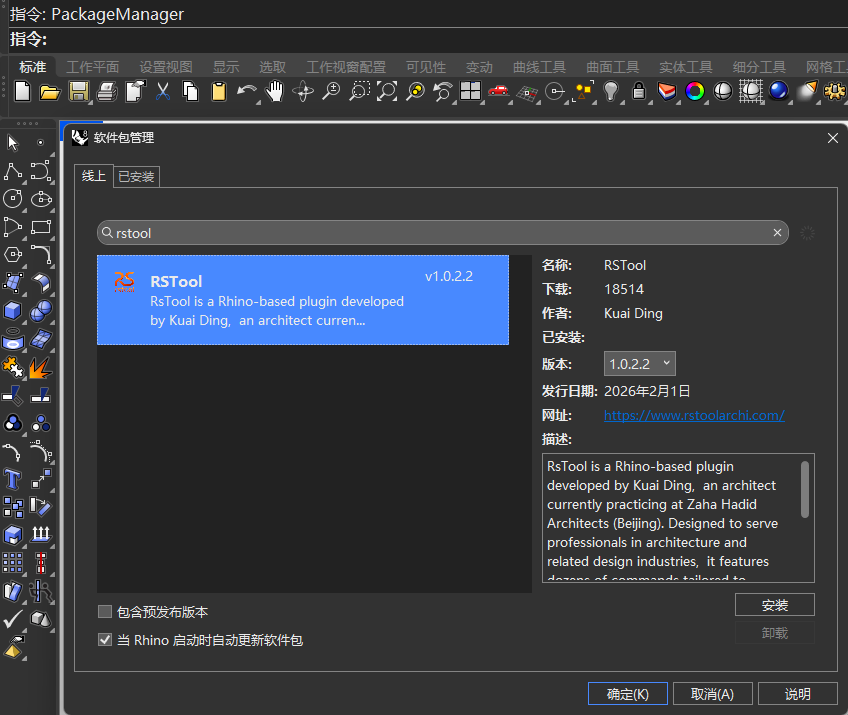
软件安装:Rhino当中输入Packagemanager,打开软件包管理,输入RSTool,搜索安装即可。第一次安装,输入RSToolStart即可打开工具列。
最新版本(v1.1.0版本)包含以下命令,可点击指令观看功能介绍。
Click the command to view the feature introduction.
参数化表皮工具/Parametric Facade Tools:
rsTesselateNurbs:对nurbs曲面进行基础图案划分/Surface Paneling
rsTileQuadNurbsBlend:基于nurbs单元制作参数化渐变表皮/Parametric Gradient Skin Generation based on Nurbs Units
rsTileMeshBlend:基于mesh单元制作参数化渐变表皮/Parametric Gradient Skin Generation based on Mesh Units
rsMeshColorPaint:网格上色/Mesh Coloring
rsTileMeshBlendByColor:基于Mesh单元颜色变化制作参数化渐变表皮/Parametric Gradient Skin Generation based on Mesh Units' colours
rsTileMeshBlendByBitmap:根据贴图干扰建立参数化渐变表皮/Create parametric gradient facades distorted wia bitmap maps
地形工具/Terrain Tools:
rsTerrain:根据等高线生成网格地形/Create Mesh Terrain from Contours
rsEarth:从地图抓取地形,需自备梯子及API/Grab Terrain from Mapbox
rsElevationAnalysis:地形高程分析/Elevation Analysis
rsSlopeAnalysis:地形坡度分析/Slope Analysis
rsSlopAspectAnalysis:地形坡向分析/Aspect Analysis
rsConcavityAnalysis:地形平坦度分析/Concavity Analysis
rsRainFlowSimulation:雨水路径模拟/Rainfall Path Analysis
rsTerrainEdit:地形编辑/Terrain Edit
散布工具/Scattering Tools:
rsSprinkerOne:将一种物件散布到目标曲面上/Scatter One Object onto The Target Surface
rsSprinkerMutiple:将多种物件散布到目标曲面上/Scatter Multiple Objects onto The Target Surface
力学找形工具/Form-finding Tools:
rsMembrane:张拉膜/Tensile Membrane
rsBubble:基于基础面,生成起泡泡造型的网格/Bubbling Effect
rsCirclePacking:相切圆/CirclePacking
rsClothFluttering:布料吹动模拟Wind-blown cloth simulation
场地工具/Site Tools:
rsRoadGenerator:根据道路中心线生成道路/Generate Roads from Centerlines
rsRoadLine:根据道路边线生成道路标线/Generate Road Markings from Curbs
rsAutoParking:自动生成停车场排布/Auto Parking Layout
建筑构件工具/Architectural Element Tools:
rsWall:绘制墙体/Draw Wall
rsWallRemoveHole:去除掉墙体上的洞口/Remove Wall Openings
rsWallExtend:延伸墙体/Extend Wall
rsWallJoin:修剪墙体/Trim Wall
rsDoor:参数开门/Parametric Door
rsWindow:参数开窗/Parametric Window
rsRailing:参数栏杆/Parametric Railing
rsCurtain:参数幕墙(基于曲面上的曲线)/Parametric Curtain Wall
rsFadingStairVertical:曲线渐消楼梯(垂直踢面)/Fading Curved Stairs(Vertical)
rsFadingStair:曲线渐消楼梯(倾斜踢面)/Fading Curved Stairs(Inclined)
rsStairBySteps:根据踏步线生成楼梯/Stair by Sketch
rsSpiralStair:旋转楼梯/Spiral Stairs
rsEscalator:自动扶梯/Escalator
rsZigZagRamp:折线坡道/Zigzag Ramp
rsOldTownRoof:四坡屋面/Hip Roof
rsDoubleFlightStairs:参数双跑楼梯生成/Parametric Double-flight Stair
rsFoofTile:生成屋顶瓦/Generate Roof Tiles
rsConvertWallToNormalBrep:RS墙体转换为brep/Convert RSwall to Brep
rsProfileDirector:rhino里的profilebulidier功能初版/Initial version replicating Rhino's ProfileBuilder feature
rsSpaceTruss:快速根据网格建立网架结构模型/Generate space truss structural models from meshes in one click
rsArchGrid:快速根据参数生成轴网/Quickly generate grid lines based on parameters
摄像机工具/Camera Tools:
rsSetCamera:在曲面上放置人视高度摄像机/Place Eye-Level Camera
rsFaceCamera:物件(曲面/网格/图块)面向摄像机(建议透视视角中使用)/Face Camera
rsBatchSnapshotCapture:批量导出快照/Batch Export Snapshots
rsBatchViewCapture:批量导出已命名视图/Batch Export Named Views
rsImportCamFromSU:从SU导入相机/Import Cameras from SU
rsExportCamToSU:导出相机到SU(内附接口文件下载地址,视频内含安装方式)/Export Cameras to SU
图层工具/Layer Tools:
rsAssignRandomColorToLayer:各图层随机赋予颜色/Randomize Layer Colors
rsAssignRandomMaterialToLayers:各图层随机赋予材质/Randomize Layer Materials
rsMergeLayers:合并图层/Merge Layers
rsCloseObjLayer:关闭物件所在图层/Hide Object's Layer
rsAssignLayerMaterialToObj:物件赋予图层材质/Set Material to "By Layer"
rsBlockObjectsToLayer:移动所有图块定义到指定图层/Move all blocks to the designated layer
rsAutoSegColorToLayer:根据语义分割赋予图层颜色/Assigning colors to semantic layers
rsMoveLayerObjs:移动所有图层物体(包括图块)/Move all objects in the layer to a target layer
rsNewLayer:新建图层/Create New Layer by Name
选取工具/Selection Tools:
rsRandomSelection:按百分比随机选取物件/Random Selection by Percentage
rsSelectBySrfEdgeCount:按边数选取曲面/Select Surfaces by Edge Count
rsGradientSelcectByCrv:按曲线干扰选取物件/Selection by Curve Attractor
rsSelectHathByName:按填充类型名称选取填充/Select Hatches by Pattern Name
rsSelectByPrintWidth:按打印宽度选取曲面/Select by Print Width
变动工具/Transform Tools:
rsGradientChangeByCrv:按曲线干扰变动物件/Transformation by Curve Attractor
rsRandomChange:随机变动物件/Random Transformation
rsMoveProject:将物件投影移动到目标曲面/网格/Drop Objects onto Target Surface
rsPlaceObjsOnCrv:根据参考曲线的点放置物件/Place Objects along Curve Points
rsMoveToOrigin:所有模型移动至原点/Move All Models to Origin
rsArrayBetween:在两点间阵列物件/Linear Array between Two Points
曲面工具/Surface Tools:
rsLoftCurvesPairs:曲线两两进行放样(主要用于多个曲线端点重合无法loft的情况)/Loft Curves in Pairs
rsSectionSweep:截面批量扫略/Batch Sweep Profiles
曲线工具/Curve Tools:
rsCleanUpOverlappingCurves:消除重叠线/Remove Overlapping Curves
rsSplitCrvAtIntersection:在曲线交点处打断曲线/Split Curves at Intersections
rsExtractIsoCrvByNum:根据数量抽离结构线/Extract Isocurves by Quantity
rsRandomTrimCurve:随机长度缩回/Randomly trim crv end
rsFilletNonPlanar:非平面曲线倒角/Curve Filleting for Non-planar Geometry
rsRepairOpenCurves:修复开放曲线/Repair Open Curves
rsUnrollCrv:曲线展直Straighten curves
点工具/Point Tools:
rsDivideCrvByRoundedCount:在曲线上按长度整除值进行等分/Divide Curve by Rounded Count
rsRandomPtsOnCrv:在曲线上随机生成点/Generate Random Points on Curve
rsRandomPtsOnObj:在物件上生成随机点/Generate Random Points on Object
网格编辑工具/Mesh Edit Tools:
rsSubdivideMesh:细分网格/Mesh Subdivision
rsMeshFrame:网格外框/Generate Mesh Frame
rsMeshWindow:网格窗户/Generate Mesh Paneling
rsDiamondMesh:菱形细分网格/Convert to Diamond Mesh
rsTriRemesh:三角形重构网格/Convert to Tri-Mesh
rsDualMesh:对偶网格/Dual Mesh
rsFlipClosedMeshOutward:翻转封闭网格中方向错误的网格面/Unify Closed Mesh Normals
rsJoinMeshesByMaterials:按材质组合网格/Join Meshes by Material
rsMoveAlongNormal:subd控制点法向移动/Move SubD control points along normals
rsUnifyQuadMesh:统一四边形网格uv/rsUnifyQuadMesh
rsConvertToMeshPanel:细分面转网格单元/Mesh Panelization of Subdivision Surfaces
rsMeshRelax:网格均匀化/Mesh homogenization
rssimplesculptor:简易地形雕刻工具/Basic terrain sculpting tool
rsReduceMeshByCurvature:按照曲率对网格减面/Mesh decimation driven by curature walues
性能分析工具/Performance Analysis Tools:
rsShadow:分析建筑投影/Shadow Analysis
rsWindAnalysis:风环境模拟/Wind Environment Simulation
rsSunlightAnalysisByGrid:平面日照分析/2D Sunlight Analysis
rsSunlightAnalysisByMesh:网格日照分析/Sunlight Hours on Mesh
辅助工具/Utility Tools:
rsHeightDot:快速标注高程点/Spot Height
rsHatchPlanarSurfaces:平面转填充/PlanarSurface to Hatching
rsSectionBox:新建剖切盒/Sectioning Box
rsDiagramArrow:绘制分析图箭头/Draw Diagram Arrows
rsAutoEnglish:界面锁定英文输入法
rsPickMaterial:类似su的材质习惯,点击模型,自动跳转到对应材质,包括图块/Pick Material
rsmaterial:材质库/Material Library
rsPasteExcel:粘贴excel/Paste Excel
rsclean:深度清理/Deep Clean
rsAutoBoxMapping:批量设置贴图轴/Batch set Texture Axes
rsAiRender:AI云端渲染,目前支持官方及悠洛仁中转API/AI-Powered Cloud Rendering
rsModel:可搭建自己的常用模型库/Build your personal model library
rsExplodeNestedBlocks:炸开图块内所有的嵌套图块/Explode All Nested Blocks
rsSuExport:按照每个物体成Block再按照图层成Block,导出模型成skp格式/Export to SU based on Layers/Blocks
rsShadowRender:阴影渲染/Shadow Rendering
rsQuickColor:快速赋予物体/图层颜色/Rapidly assign colors to objects or lavers
rsMenu:常驻街口快捷菜单,可快速点击执行命令/Persistent floating quick-access menu for one-click command execution
趣味工具/Playground:
rsThreeBody:模拟三体运动/Three-Body Orbital
rsBrowser:摸鱼小命令/Have a cup of Tea
rsWechatSend:定时微信消息
rsBoids:集群运动模拟/Flocking motion simulation
- - - - - - - - - - - - - - - - - - - - - - - - - - - - - - - - - - - - - - - - - - - - -
版本更新历史:
20260615版本(v1.1.2版本)更新
新增命令/New commond:
rsProfileDirector:rhino里的profilebulidier功能初版/Initial version replicating Rhino's ProfileBuilder feature
rsQuickColor:快速赋予物体/图层颜色/Rapidly assign colors to objects or lavers
rsBoids:集群运动模拟/Flocking motion simulation
rsClothFluttering:布料吹动模拟Wind-blown cloth simulation
rsMeshRelax:网格均匀化/Mesh homogenization
rssimplesculptor:简易地形雕刻工具/Basic terrain sculpting tool
rsMenu:常驻街口快捷菜单,可快速点击执行命令/Persistent floating quick-access menu for one-click command execution
rsReduceMeshByCurvature:按照曲率对网格减面/Mesh decimation driven by curature walues
rsSpaceTruss:快速根据网格建立网架结构模型/Generate space truss structural models from meshes in one click
rsTileMeshBlendByBitmap:根据贴图干扰建立参数化渐变表皮/Create parametric gradient facades distorted wia bitmap maps
rsArchGrid:快速根据参数生成轴网/Quickly generate grid lines based on parameters
rsUnrollCrv:曲线展直Straighten curves
修复昔干bug,优化部分命令操作体验/Resolvedmultiple bugs and optimized the operation workflow of several commands
20260601版本(v1.1.1版本)更新
新增命令/New commond:
rsFilletWall:墙体倒角/Fillet Wall
rsWalker:行走模式,可以Shift+wasdqe前后左右上下行走,不妨碍使用建模快捷键/ Walkthrough mode. Navigate with Shift + WASDQE for forward/backward/left/right/up/down without overriding Rhino modeling shortcuts.
优化:
1.优化网格渐变表皮生成逻辑,生成的渐变表皮可以对齐顶点
2.rsShadowRender可以控制阴影深浅和外边框厚度倍数。
3.用户可以修改rsRoofTile的瓦间距
4.优化生成栏杆和门窗的逻辑,修改参考线时,生成物体自动更新。
Optimizations
1.Improved algorithm for gradient mesh skin generation; output panels align to vertices.
2.Added adjustable shadow density and outline thickness multiplier in rsShadowRender.
3.Custom tile spacing parameter added for rsRoofTile.
4.Updated generation logic for railings, doors and windows; generated elements auto-update when reference curves are edited.
修复bug:
1.修复上报版本失败导致无法载入插件的bug
2.修复一些窗口显示不全按键的bug
3.修复栏杆和门生成失败会导致rhino崩溃的bug
4.修复坡屋顶有洞的bug
5.修复rsRoofTile方向可能出错的bug
6.修复生成窗户时只能选择一个墙体的bug
7.修复rsbubble在mm模板下生成失败的bug
Bug Fixes
1.Fixed plug-in load failure caused by unsuccessful version submission.
2.Fixed incomplete button rendering in several dialog windows.
3.Fixed Rhino crash triggered by failed railing or door generation.
4.Fixed unwanted openings appearing on hip roof geometry.
5.Fixed incorrect orientation issue with rsRoofTile roof tiles.
6.Fixed restriction limiting window creation to a single host wall.
7.Fixed rsBubble generation failure under millimeter unit template.
20260519版本(v1.1.0版本)更新
新增命令/New commond:
rsShadowRender:阴影渲染/Shadow Rendering
rsNewLayer:新建图层/Create New Layer by Name
rsConvertToMeshPanel:细分面转网格单元/Mesh Panelization of Subdivision Surfaces
rsFoofTile:生成屋顶瓦/Generate Roof Tiles
rsConvertWallToNormalBrep:RS墙体转换为brep/Convert RSwall to Brep
rsRepairOpenCurves:修复开放曲线/Repair Open Curves
rsRandomPtsOnObj:在物件上生成随机点/Generate Random Points on Object
rsMeshColorPaint:网格上色/Mesh Coloring
rsTileMeshBlendByColor:基于Mesh单元颜色变化制作参数化渐变表皮/Parametric Gradient Skin Generation based on Mesh Units' colours
rsWechatSend:定时微信消息
rsSunlightAnalysisByGrid:平面日照分析/2D Sunlight Analysis
rsSunlightAnalysisByMesh:网格日照分析/Sunlight Hours on Mesh
20260329版本(v1.0.9版本)更新
新增命令/New commond:
rsPasteExcel:粘贴excel/Paste Excel
rsclean:深度清理/Deep Clean
20260324版本(v1.0.6版本)更新
新增命令/New commond:
rsmaterial:材质库/Material Library
rsMoveAlongNormal:subd控制点法向移动/Move SubD control points along normals
优化:
rsTileMeshBlend和rsTileQuadNurbsBlend支持对话框交互,实时预览
rsDiagramArrow绘制分析图箭头支持对话框以及锥状化
20260310版本(v1.0.4版本)更新
新增命令/New commond:
rsDiagramArrow:绘制分析图箭头/Draw Diagram Arrows
rsDoubleFlightStairs:参数双跑楼梯生成/Parametric Double-flight Stair
rsMoveLayerObjs:移动所有图层物体(包括图块)/Move all objects in the layer to a target layer
rsFilletNonPlanar:非平面曲线倒角/Curve Filleting for Non-planar Geometry
rsPickMaterial:类似su的材质习惯,点击模型,自动跳转到对应材质,包括图块/Pick Material
rsTerrainEdit:地形平整处理/Flattening of the terrain
WeaveBird套装:
rsSubdivideMesh:细分网格/Mesh Subdivision
rsMeshFrame:网格外框/Generate Mesh Frame
rsMeshWindow:网格窗户/Generate Mesh Paneling
rsDiamondMesh:菱形细分网格/Convert to Diamond Mesh
rsTriRemesh:三角形重构网格/Convert to Tri-Mesh
rsDualMesh:对偶网格/Dual Mesh
修复bug:
修复rsAIRender上传参考图失效问题
增加rsAIRenderOld老版本(图标右键)
增加rsModelOld老版本(图标右键)
优化:
rswall增加偏移选项
rsBrowser摸鱼浏览器切换后不会重置网页
rsExtractIsoCrvByNum抽离结构线支持修建曲面
rsAutoBoxMapping增加xyz三轴旋转贴图轴
20260210版本(v1.0.3版本)更新
新增命令/New commond:
贴图轴工具/Mapping Widget Tools:
rsAutoBoxMapping:批量设置贴图轴/Batch set Texture Axes
UI优化/UI Optimizations:
rsModel模型库:新增搜索框/Added a new search bar
rsTerrain地形:下载界面优化/Optimized the terrain download interface.
功能优化/Feature Refinement:
1.栏杆和表皮生成后默认建立群组物体
Railing & Facade Generation: Objects are now automatically grouped after generation.
2.自动扶梯角度可以自由输入
Escalators: Added support for custom angle input.
3.rsheight支持指定单位
rsheight supports specified units.
4.Airender增加提示词模板,支持风格迁移及局部重绘
Airender adds prompt templates,and now supports syle transfer and inpainting.
bug修复/Bug Fixes:
1. 修复了风环境分析只能在xy平面的bug
Fixed an issue where Wind Analysis was restricted to the XY plane.
2.修复了开启rsAutoEnglish之后cad会卡顿的问题
20260202版本(v1.0.2版本)更新
新增命令/New commond:
rsBrowser:摸鱼小命令/Have a cup of Tea
rsAutoEnglish:界面锁定英文输入法
rsAutoSegColorToLayer:根据语义分割赋予图层颜色/Assigning colors to semantic layers
优化:
rsAiRender命令新增支持国内中转API,自行决定是否使用
rsAssignRandomColorToLayer命令调整,不更改已经赋予颜色的图层
20260127版本(v1.0.1版本)更新
新增命令/New commond:
rsWindAnalysis:风环境模拟/Wind Environment Simulation
rsExtractIsoCrvByNum:根据数量抽离结构线/Extract Isocurves by Quantity
rsRandomTrimCurve:随机长度缩回/Randomly trim crv end
rsBlockObjectsToLayer:移动所有图块定义到指定图层/Move all blocks to the designated layer
优化:
rsEarth可以记录上次搜索位置
rsGradientSelcectByCrv命令可以选择多个曲线作为干扰源
20260118版本(v1.0.0版本)
最初的起点